Natural-language analysis
Ask questions about approved ERP and operational data without writing SQL.
WEB, iOS & ANDROID
Cayra Client gives authorized users a consistent place to ask questions of approved ERP and operational data, continue supported conversations across devices, and review results within workspace permissions.
Requires an active Cayra account and administrator-provisioned access. Available controls vary by plan, role, interface, and deployment.
Approved workspace
Operations workspace
Sample result
3 orders require review
Supplier delay and incomplete packing confirmation are the leading example signals.
Illustrative workspace · sample data · interface availability varies
The workspace owner creates or enables the user and assigns the applicable source, role, and plan access.
Use a one-time code on web or mobile. Device-level biometric access may be available on supported iOS and Android devices.
End users ask business questions without writing SQL. Database and schema setup still belongs to an administrator or DBA.
Read the summary and, on supported surfaces, review generated SQL, selected tables, execution metadata, or result previews.
Continue the conversation across devices and create Excel or PDF output where the selected plan and interface support it.
WEB + MOBILE CONTINUITY
Conversation history is associated with the selected Cayra workspace so an approved user can move between supported web and mobile experiences. Retention and deletion still follow the applicable deployment and account terms.
Web
Start the question
Mobile
Continue the review
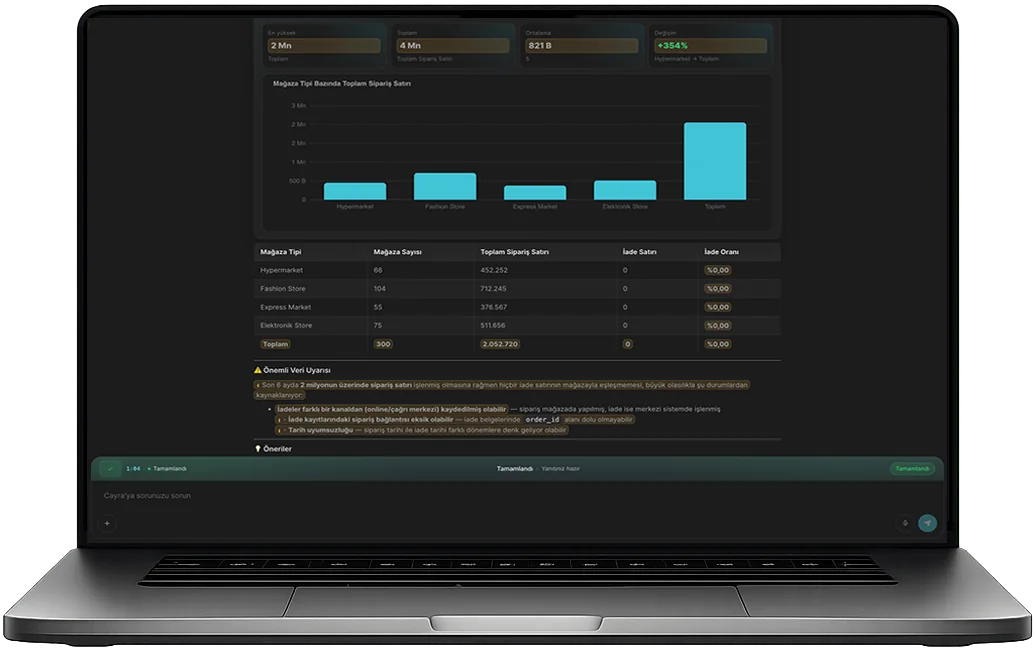
DESKTOP PRODUCT VIEW
This original Cayra Client capture shows a query-derived chart, detail table, review warning, and suggested follow-up inside the desktop experience.
What this capture demonstrates
NATIVE iOS & ANDROID APPS
Cayra Client is listed in the U.S. App Store and Google Play. Supported mobile workflows use the same provisioned workspace and permissions configured by your administrator.
SAMPLE MOBILE WORKSPACE
Operations
Three orders need review. The main drivers are supplier delay and incomplete packing confirmation.
Ask questions about approved ERP and operational data without writing SQL.
Continue supported conversations across web and mobile within the same provisioned workspace.
Generate or download supported Excel and PDF outputs where enabled.
Review generated SQL and execution metadata on interfaces that expose those controls.
Use provisioned groups and workspaces for internal coordination where enabled.
Business plans can provide assigned external users limited portal access; this is not a procurement or contract-management portal.
Available on Pro and Business for supported PDF, XLSX, XLS, CSV, DOCX, and TXT files, subject to current file and storage limits.
Source setup, user provisioning, roles, and advanced configuration remain on the supported administrative surface.
SQL, selected tables, execution details, and result previews vary by interface, role, and deployment.
Mobile and web activity use the same plan balance and processing capacity. One credit is not equivalent to one question.
ACCESS CONTROL
Cayra Client uses the identity, plan, source permissions, database account, and deployment controls already defined for the workspace.
Review security and deploymentApproved identity
Cayra workspace
Database permission
Operations
Finance
Retail
Manufacturing
START WITH CAYRA CLOUD
Start with Cayra Cloud for $20 per month, then provision the users, sources, and supported device access that fit your operating model.